iPhone · Apple Watch
140 HIIT and stretching moves. Your pace.
From burpees to child’s pose, build a session with no equipment. Set your work, rest, and rounds, and let voice cues call every switch.
Free to start. No account.
Exercise Library
140 moves. Clear instructions.
- Bear Crawls
- Decline Push-Ups
- Alternating Donkey Kicks
- Bicycle Crunches
- Ankle Circles
- 90/90 Hip Stretch
- Burpees
- Diamond Push-Ups
- Alternating Lunges
- Bird-Dog
- Arm Circles
- Arm & Shoulder Stretch
- Butt Kicks
- Incline Push-Ups
- Alternating Reverse Lunges
- Boat Pose
- Asian Squat Hold
- Camel Pose
- Front Kicks
- Pike Push-Ups
- Bulgarian Split Squats
- Crunches
- Asian Squat Rocks
- Chest & Shoulder Stretch
- High Knees
- Push-Ups
- Calf Raises
- Dead Bug
- Cat-Cow
- Chest Opener (Hands Behind Head)
- Jab-Cross Combo
- Standing Rows
- Donkey Kicks
- Flutter Kicks
- Chin Tucks
- Child's Pose
The voice
Work.Rest.Switch sides.
This is the part nobody films: knowing when to stop. Zestimer names the next move before it arrives, counts the last three seconds out loud, and tells you when to switch sides, so you are never squinting at a screen halfway through a plank.
- 00:00Start bicycle crunches
- 00:273 · 2 · 1
- 00:30Rest
- 00:40Next up: side plank, left
- 01:10Switch sides
Your workout
Take one, build one, or ask for one.
The app ships with a deep shelf of hand-picked routines for strength, HIIT and stretching, made for training at home. Build your own out of the 140 moves, or describe the session you want and let the AI write it.
- Ask for one
- Twelve minutes, a mat, a sore lower back. Zestimer writes the workout. Don’t like a move? Say so, in plain words, and it swaps it.
- Build one
- Drag, tap, done. Circuits, rounds, work and rest come together in about a minute, and stay yours.
- Take one
- Ready-made routines, already timed. Open one and start.
Everywhere
One workout. Every screen.
- Your iPhone runs the show
- The dial, the coach, the library. Home base.
- Your wrist keeps the beat
- The full timer, standalone on Apple Watch.
- Your streak lives on the Home Screen
- Quick Start launches a workout in one tap; the heatmap keeps the flame in sight. Each comes in three sizes.
- Your TV joins the workout
- Cast to any AirPlay screen. The room sees the move, your phone stays the remote.
- And everything stays in step
- Workouts land in Apple Health, and iCloud keeps every device on the same page.
Also
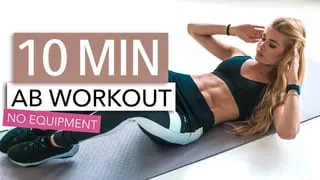
And the workout video you saved and never did.
Paste a social media link and Zestimer reads the video, names the moves, times the sets, and hands back a workout you can follow, and change. A full class or a fifteen-second clip both work.
- 1A video you found
- 2Zestimer reads it
- 3A workout that runs itself
Free to start. No account.
Import a workout
 10:26
10:26
Just need a clock?
The timers, without the app.
Every protocol below runs free in this browser, already set to the clock it is named for. When you want it in your pocket, with a voice and a wrist, the app is one tap away.
- Tabata Timer20 seconds on · 10 seconds off · 8 rounds · 4 minutes total
- HIIT Timer30 seconds on · 30 seconds off · 10 rounds · 10 minutes total
- EMOM Timer60-second minutes · 10 rounds · 10 minutes total
- AMRAP TimerOne 10-minute block · no scheduled rest
- Circuit Training Timer45 seconds per station · 15 to move · 12 stations · 12 minutes total
- Boxing Round Timer3-minute rounds · 1 minute rest · 12 rounds · 48 minutes total
Pricing
Free
Everything a workout timer should do.
Download it and train today. No account, no cap on how often you train.
Zestimer Pro
- 140 moves with step-by-step instructions
- Turn any YouTube Short into a workout
- Turn any TikTok video into a workout
- Generate a workout from scratch with AI
- Cast your workout to any TV or AirPlay display
- Run any workout from your Apple Watch
- Home Screen widgets for quick starts and your streak
- Unlimited custom workouts
7 days free
Prices in USD. The App Store shows your local price.
How it works
Straight answers
What you train with
130 moves, every one illustrated and every one equipment-free: HIIT and bodyweight strength, mobility, stretching and cool-downs, all of them doable in the space beside a bed. The ready-made routines are built out of them: open one and press start.
Or describe what you want and the AI writes it, or build it yourself in the editor. Everything lands in the same library, runs on the same dial, and is edited the same way.
What running it is like
The dial counts down the current interval; the ring empties as it goes. The next move is named before each change, the last three seconds are counted, rests are announced, and so is the moment to switch sides, which a video cannot tell you, because it does not know which side you started on.
Turn all of that down to beeps, down to haptics, or off. The screen stays awake, music keeps playing, and the session mirrors to an Apple Watch, which can also run it alone.
Press and hold to end a session, the one gesture in the app that asks you to mean it.
What Zestimer reads from a video
The useful part of a workout video is a list: which move, for how long, in what order, with how much rest. Zestimer reads the video itself: what is said, what is shown, and the on-screen timers most fitness creators put in the corner. Not the description or the comments, which are often wrong and often missing.
A ten-minute follow-along and a forty-second TikTok come out the same shape: circuits, moves, intervals.
The output is a Zestimer workout. Not a transcript, not a bookmark, not a link that opens the video again.
What you can change
An AI-built workout is editable before you start it. Every interval is a number you can change, every move can be dropped or swapped, and the whole thing can be adjusted in plain words: "make the rests longer", "swap the burpees for something quieter".
What the creator gets
The video stays on the workout, credited, one tap from the channel it came from, right there when you want to check a movement mid-session. Zestimer hosts nothing and re-uploads nothing: it makes a timer that follows a video you found, and points you back at the person who made it.
Do I need an account?
No. Zestimer has no accounts. Your workouts live on your device and in your own iCloud.
What does it cost?
The interval timer, the illustrated exercise library and the ready-made routines are free, with no cap on how often you train. Video imports, AI-built workouts, TV casting, Apple Watch, the Home Screen widgets and unlimited custom workouts are Zestimer Pro, which starts with a free trial.
Does it need an internet connection?
Importing a video does. Running one does not. Once it is in your library it runs offline, on the Watch too.
Which platforms can it import from?
YouTube (Shorts included), TikTok, Instagram, Threads and X. Each platform decides what an outside app may read, so support can change or stop working when one of them does. The import is there to get your first workouts built fast, not to be the final word: Zestimer’s founder believes you should be able to adjust any workout to your own body and day, so every move, second and round it brings in stays yours to change.
Are the exercises animated?
The library is illustrated today; animation is in the works.
Is there an Android version?
Not today. Zestimer is an iPhone and Apple Watch app, built by one person.
Made by one person
I write code for a living, which gave me a sore back and terrible posture. I built the stretching app I wanted, then got annoyed that every video I saved stayed a video.
Workout Complete
Your move.
Zestimer is free on the App Store. Pro adds AI workouts, video imports, TV casting and unlimited custom workouts.
- moves, no equipment
- 140
- minute ready-made routines
- 5–10
- accounts required
- 0