From YouTube
Turn a YouTube workout into a follow-along timer
Paste a link, or search YouTube inside the app. Zestimer watches the video, names the moves, times the sets, and hands back a workout that runs itself: no pausing, no scrubbing back to catch what you missed.
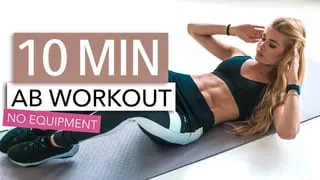
 Bicycle Crunches0:30Rest 0:10
- Reverse Crunches0:30Rest 0:10
- Leg Raises0:30Rest 0:10
- Russian Twists0:30Rest 0:10
- + 16 more moves
A circuit that counts itself
How it works
Three taps, then follow along
Paste a link, or search in the app
Copy a YouTube URL and paste it into Zestimer, or search YouTube without leaving the app. Shorts and full-length videos work the same way.
Zestimer watches it
It names each exercise, times the sets, and lays the session out as circuits, every move with a figure, every interval with a length.
Follow the dial
The workout runs itself: a countdown for every move, the next one called out loud, rests announced. Your screen stays awake, and the session mirrors to your Apple Watch.
What you get
A workout, not a bookmark
- The creator keeps the credit
- The video stays on the workout, one tap away. This is a way to follow along with what a channel already made, not a way to launder it.
- Yours to adjust
- Stretch a 30-second set to 45, or drop a move you would rather skip. The converted workout is an ordinary Zestimer workout once it lands.
- Saved to your library
- Run it again next week without going back to find the video, the reason a folder of saved workout videos so rarely turns into a routine.
- Handled quietly
- Voice cues, beeps and haptics. Apple Music and Spotify keep playing. Apple Health and iCloud stay in sync.
Converting videos is part of Zestimer Pro, which starts with a free trial. The timer, the exercise library and the ready-made routines are free — see what each plan includes.
Frequently asked questions
- Does it work with YouTube Shorts?
- Yes. Paste a Shorts link or a full-length video and both come back as guided, timed routines.
- Do I have to keep the video playing?
- No. Zestimer rebuilds the session as its own timed workout, so you follow the countdown rather than the video: no pausing, no scrubbing back. The video stays linked on the workout if you want to check a movement.
- Which YouTube workouts convert best?
- Videos that move through named exercises at a steady pace: HIIT and Tabata circuits, stretching and mobility routines, bodyweight sessions. A video with no repeating structure gives the timer less to hold on to.
- Can I change the timings afterwards?
- Yes. Every move and every rest is editable once the workout lands in your library, so you can lengthen a set, shorten a rest, or drop a move entirely.
- Does the creator still get credit?
- Yes. The video stays credited on the workout, one tap back to the channel it came from.
- Is turning YouTube videos into workouts free?
- The interval timer, the illustrated exercise library and the ready-made routines are free. Converting videos is part of Zestimer Pro, which starts with a free trial.
- Does it work on Apple Watch?
- Yes. A converted workout mirrors to the Apple Watch like any other Zestimer session, with the timer and haptics on your wrist.
Keep reading
- YouTube workoutsThe same thing for a ten-minute follow-along you keep having to scrub back through.
- Free interval timerWork, rest and rounds in your browser. No download, no account.
- HIIT work-to-rest ratiosWhat the common ratios are for, and how to pick one that matches the session.
- Ready-made routinesBuilt sessions to run today, if you would rather not convert anything.
Bring your own video.
The channel you already follow, rebuilt as a session that counts itself down.
Get Zestimer